Wi-Fi testing, troubleshooting and learning
How Wi-Fi really works, from the test lab
I test home routers and mesh systems before they reach customers. This site shares what I’ve learned: what breaks, why, and how to prove it.
Longer waves travel through walls more easily, but the band is crowded and offers fewer channels.
Learn more about 2.4 GHz Wi-Fi →What you’ll find here
01
Interactive Wi-Fi lab
Hands-on models of MIMO, beamforming, QAM, roaming, channel bonding, antennas and more. Move the sliders and see the physics change.
02
Real-world investigations
Defects and behaviours found in testing, from reconnect loops to roaming failures, explained with the evidence that pinned them down.
03
Home Wi-Fi made clear
Plain-English guides to router placement, mesh, channels and why “full bars” doesn’t always mean fast.
A short history
Where Wi-Fi came from
1985
The spectrum opens
The US regulator (FCC) allowed unlicensed use of the 900 MHz, 2.4 GHz and 5.8 GHz bands for spread-spectrum radios. Without this decision there would be no Wi-Fi.
Late 1980s
The first wireless LANs
NCR, later part of AT&T, developed WaveLAN in the Netherlands. Vic Hayes from that team went on to chair the IEEE 802.11 working group for a decade and is often called the father of Wi-Fi.
Early 1990s
Solving the echo problem
In Australia, a CSIRO team led by John O’Sullivan tackled the biggest obstacle indoors: radio signals bouncing off walls and arriving as smeared echoes. Their patented approach, building on OFDM and error correction, became important to later Wi-Fi standards.
1997
The first standard
IEEE 802.11 was published, offering 1 and 2 Mbps in the 2.4 GHz band.
1999
Wi-Fi gets a name
802.11b raised speeds to 11 Mbps at 2.4 GHz, and 802.11a introduced OFDM at 54 Mbps in 5 GHz. The industry group that became the Wi-Fi Alliance formed the same year, and the name “Wi-Fi” was born.
2003 to 2013
Faster and smarter
802.11g brought 54 Mbps to 2.4 GHz. 802.11n (now called Wi-Fi 4) added MIMO, sending several data streams at once. 802.11ac (Wi-Fi 5) moved to wider 5 GHz channels and added multi-user MIMO.
2019 onward
Efficiency and new spectrum
Wi-Fi 6 introduced OFDMA to serve many devices at once, and Wi-Fi 6E opened the 6 GHz band. Wi-Fi 7, certified from 2024, adds 320 MHz channels, 4096-QAM and multi-link operation across bands at the same time.
Each generation solved a real problem: interference, echoes, crowded spectrum, too many devices. Understanding those problems is still the best way to troubleshoot Wi-Fi today.
Further reading: IEEE 802.11 Working Group · Wi-Fi Alliance history · CSIRO: Wireless LANs
Latest from the Library
-

IEEE 802.11 Reason codes to identify network issues
IEEE 802.11 is a set of standards for wireless LANs, and it defines various codes that can be used to identify network issues. These…
-
Dynamic Frequency Selection (DFS): Beyond Radar Detection
Introduction DFS is not a new topic and anyone who has a little bit of knowledge of RF or WiFi has some sort of…
-
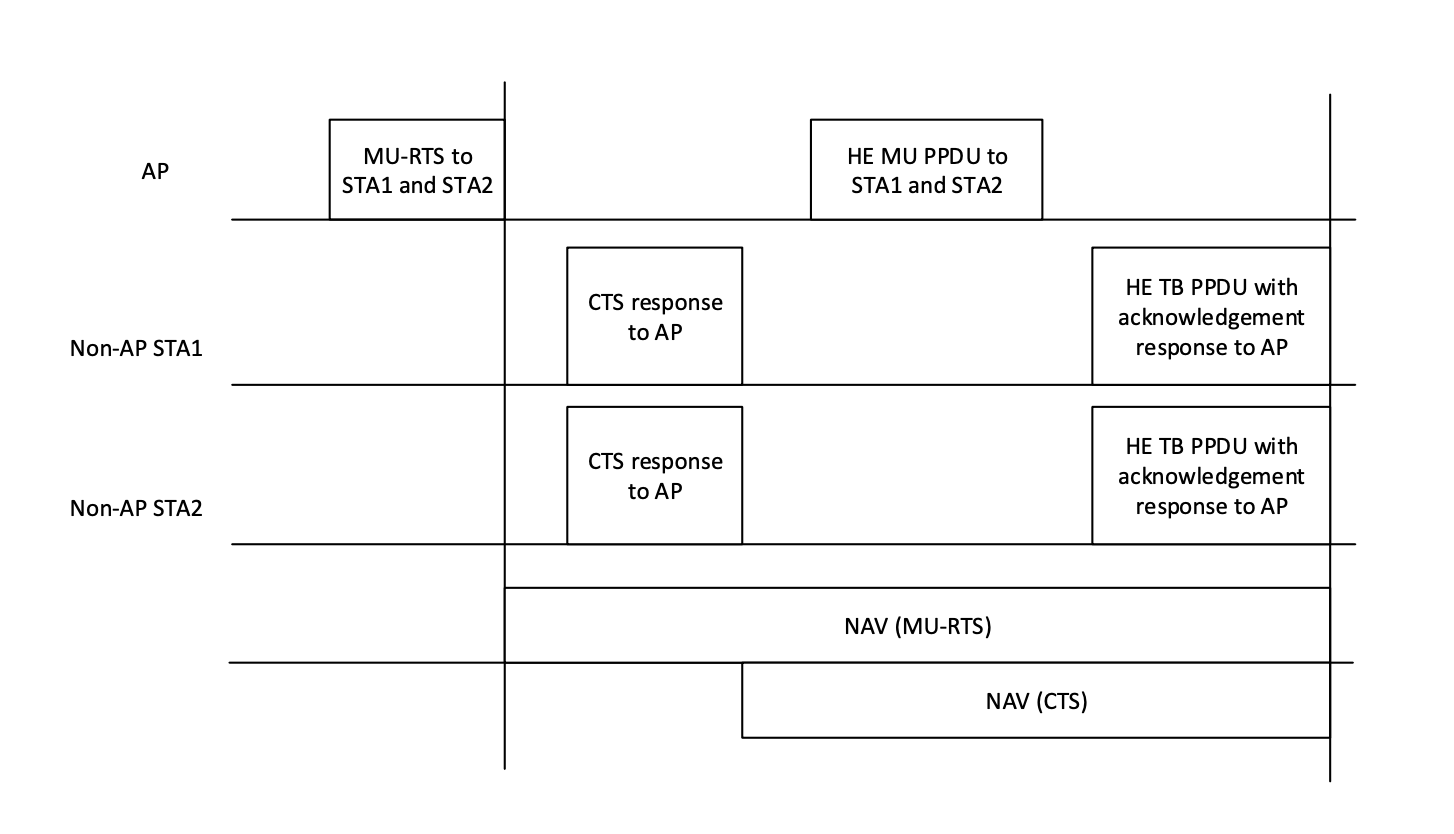
802.11ax MU PPDU
MU-PPDU: We have explored the first part (MU-trigger frame) of MU-OFDMA transmission already in a different post. Once the following conditions are met: MU-RTS…
About
Who’s behind this
I’m Zeeshan, a Wi-Fi Architect working in pre-release quality engineering for home broadband equipment. My team tests routers and mesh systems before consumer release: roaming, band steering, mesh behaviour, IoT devices, long-term stability, firmware update recovery and interoperability with real clients.
Outside work I build tools for measuring Wi-Fi quality of experience, and I write about the problems I see most often in the field. If you work in Wi-Fi, or just want to understand why your home Wi-Fi behaves the way it does, you’re in the right place.
Get in touch
Questions, corrections, or interested in Wi-Fi testing and consulting work? Email info@wifi-professionals.com.